When to move from spreadsheets to custom software (and when not to)
A spreadsheet is an excellent tool until the day it is not. This guide helps you recognise that day with concrete signs, without assuming the answer is always a new program.
1Excel is not the problem
Almost every company that ends up commissioning software started with a spreadsheet, and that was a good decision: it is fast, flexible and anyone understands it. The trouble starts when the sheet stops being one person’s tool and becomes the place where part of the business lives.
At that point the question is not “spreadsheet or not?” but “what is it costing us to carry on like this, and what is the proportionate alternative?”. Sometimes the answer is custom software; sometimes an off-the-shelf program, or simply a better organised sheet.
2Signs the spreadsheet has outgrown its job
None of them alone forces a change. If you recognise three or four, it is worth stopping to think:
- There are several copies of the same file and nobody is sure which one is right.
- Only one person really understands how it works, and when they are away, the work waits.
- The same data is copied by hand from email, from PDFs or from another program.
- A formula error has already cost money or an argument with a customer or supplier.
- You need to know who changed a figure and when, and the sheet cannot tell you.
- Several people need to work at the same time and overwrite each other, or have to take turns.
- Important reminders (a due date, a pending order, low stock) depend on someone remembering.
3Five questions to ask before deciding
Answer them with the person who uses the sheet every day, not only with whoever asked for it. The answers help you decide and are also what any supplier will need in a first conversation:
- Which decision is made with this sheet, and what happens if the data is wrong?
- How many hours a week go into maintaining it, copying data or fixing errors?
- How many people depend on it, and where do they use it from?
- What is particular about the way you work that an off-the-shelf program would not capture?
- Which other programs would it need to talk to: invoicing, accounting, online shop, email?
4When custom software is not the answer
If the sheet is used by one person, changes little and errors have no serious consequences, the sensible thing is to leave it alone. A new program also needs maintaining, and it makes no sense to pay for that to fix a small annoyance.
Nor does it make sense when your process is standard for your sector and an off-the-shelf program covers it well: a management package, a booking tool or a CRM. Then it is usually more reasonable to adapt to it and, if needed, build custom connections only for what is missing.
5The three possible ways out
With the answers above, the decision usually falls into one of these three:
- Tidy up the sheet: separate data from calculations, protect the key cells, keep a single shared copy and write down how it works. It is cheap and sometimes enough.
- An off-the-shelf program: when the process is common and the program covers almost all of it, with a custom connection for whatever does not fit.
- Custom software: when the process is your own, supports important decisions and is used by several people. It can start with just one part of the sheet, the one that costs most hours.
6Processes that came out of a spreadsheet
Farmacta
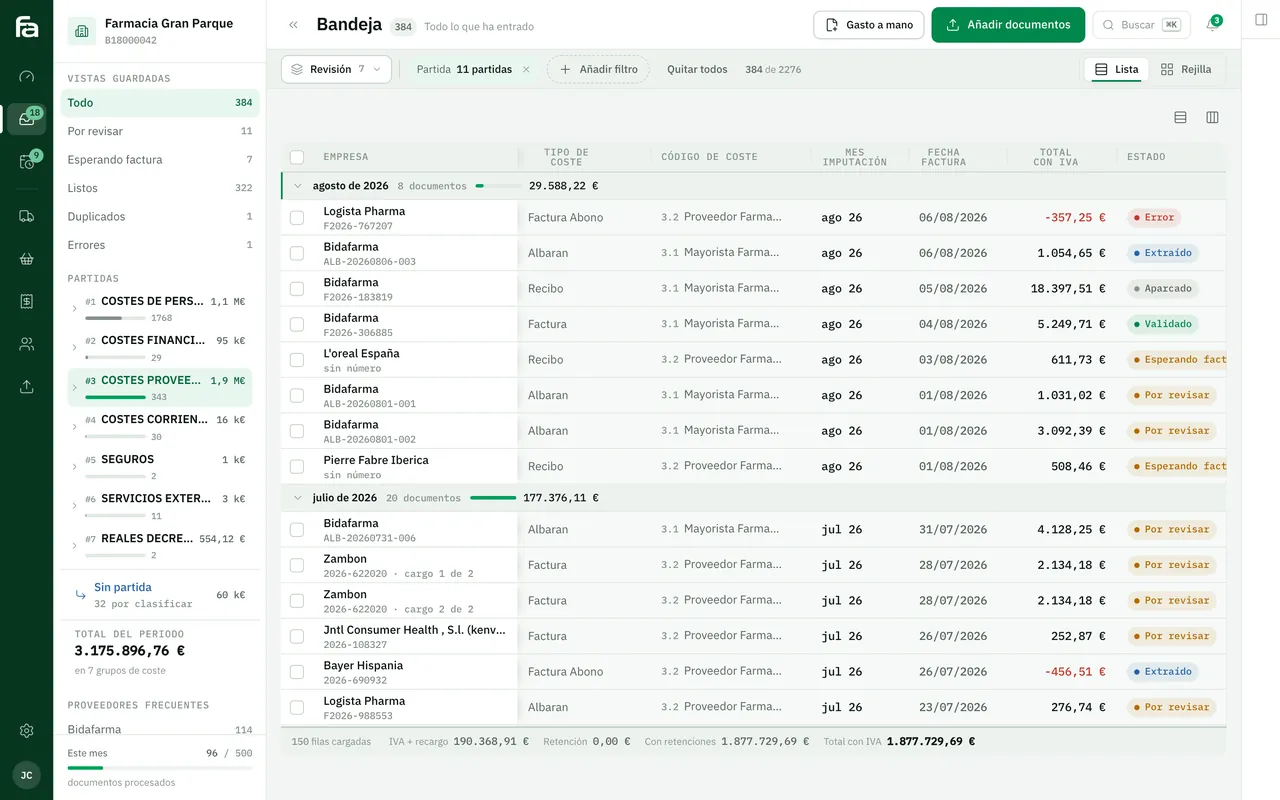
A pharmacy’s back office, built on its paperwork
Due dates, cash flow and analytics for a pharmacy, previously kept by hand, now come out of the delivery notes and invoices Farmacta reads as PDFs. In use at its first pharmacy.
In use at its first pharmacy

Certero
Tender intelligence for public works
Each public authority’s award history, which a contractor usually keeps in scattered sheets, brought together and crossed with the documents of each tender. Live at certero.es.
Live at certero.es. Accepted into NVIDIA Inception.
7Frequently asked questions
Is an off-the-shelf program or a custom one better?
It depends on how particular your process is. If an off-the-shelf program covers almost everything, it is usually the better option and we will tell you so. Custom software makes sense when the way you work is part of what sets you apart, or no program captures it.
Do I have to give up Excel completely?
No. The usual approach is to take the critical part out of the sheet and keep using Excel for one-off analysis. A good system exports data to a spreadsheet whenever needed.
Can I start with just one part of the sheet?
Yes, and that is what we recommend: the tab or process that costs most hours or errors. If that first phase solves nothing, you find out quickly and at little cost.
What should I prepare before talking to you?
The sheet as it is (with invented or anonymised data if it is sensitive) and your answers to the five questions in this guide. Our guide on preparing a project goes into more detail.
Does your sheet show three or more of these signs?
Tell us what you track with it and we will tell you frankly which of the three ways out suits you, even if it is not ours.
Tell us your problem